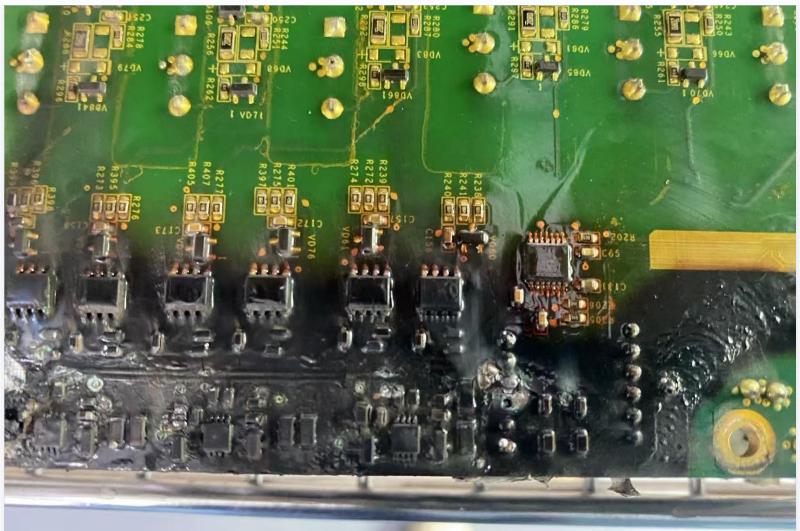
Precautions for Daily Maintenance of EV Charger Power Modules (to Prevent Severe Damage/”Explosion”)
In response to the causes of EV Charger power module severe damage (“explosion”) mentioned in the previous article, daily maintenance should focus on heat dissipation, cleaning, moisture prevention, connection fastening, and status monitoring:
- Maintain Efficient Operation of the Heat Dissipation System
- Regularly Clean Heat Sinks: Depending on the dust level in the environment, use dry compressed air or a soft brush every 1–3 months (or more frequently) to remove dust and lint from heat sink fins, fan blades, air inlets, and air outlets. (Top Priority!)
- Check Fan Operation: Regularly turn on the device to listen for abnormal fan noises, and observe whether the fan is rotating and if its speed is sufficient. If there are abnormalities (such as abnormal noise, stalling, or slow rotation), replace the fan promptly.
- Ensure Good Ventilation: The air vents of the charger cabinet/rack must not be blocked, and sufficient heat dissipation space should be left around the cabinet. Avoid installing the device in a closed, high-temperature environment.
- Keep Clean and Dry
- Clean the Exterior and Interior (Operate with Caution): Regularly clean dust from the device exterior. If interior cleaning is required, ensure the power is disconnected and the bus capacitors are fully discharged first, then have professional personnel use dry compressed air to blow off dust (avoid touching component pins). Never use a damp cloth or liquid cleaners.
- Prevent Moisture and Condensation: For humid environments (e.g., basements, coastal areas), ensure the cabinet is well-sealed. If necessary, install a heater (for anti-condensation in low temperatures) or a small dehumidifier inside the cabinet. Check whether the cabinet’s sealing strips are intact.
- Prevent Dust and Foreign Objects: Ensure the cabinet door is tightly closed and the cable entry/exit ports are well-sealed to prevent small animals, insects, and large amounts of dust from entering.
3. Regular Inspection of Electrical Connections
- Tighten Connectors: (To be operated by professionals after power disconnection and discharge) Periodically (e.g., every six months or one year), inspect and re-tighten the screw/bolt connections at AC input, DC output, internal power busbars, and grounding wires. Looseness will increase contact resistance, leading to heat generation or even sparking.
- Check Connectors: Verify that the plug-in connectors between the module and busbars, driver boards, etc., are fully inserted in place, and check for signs of ablation or discoloration.
4. Conduct Preventive Inspections and Condition Monitoring
- Infrared Temperature Measurement: Periodically (e.g., every quarter), use an infrared thermal imager to scan the charging module, connection points, cable joints, and other parts while the equipment is in operation. Check for abnormal hot spots (temperatures significantly higher than surrounding areas or historical records).
- Record Operating Parameters: Monitor and record key parameters of the module, such as output voltage, current, power, and temperature. Compare these parameters with historical data or normal ranges to identify abnormal trends (e.g., gradual temperature rise, decreased efficiency).
- Visual Inspection: Periodically open the cabinet door (under safe conditions) for visual inspection. Check the module’s appearance for signs such as capacitor bulging, scorch marks, component damage, capacitor liquid leakage, and obvious rust.
5. Adhere to Operating Procedures
- Avoid Overload: Use the equipment strictly in accordance with its rated power; avoid long-term overload operation.
- Standardize Start-Up and Shutdown: Follow the operation manual to standardize the start-up and shutdown of the equipment.
- Promptly Address Alarms: If any alarm message appears on the equipment, immediately shut down the device for inspection. Do not resume operation until the cause is identified and the fault is eliminated. Never operate the equipment with faults or disable alarms.
6. Environmental Management
- Control Ambient Temperature: Install the charging pile in a cool and well-ventilated location as much as possible. Strengthen patrols and heat dissipation measures during extreme high-temperature weather.
- Prevent Physical Damage: Protect the equipment from external damage such as impact and crushing.
7. Professional Maintenance
- Regular Professional Maintenance: In accordance with the manufacturer’s recommended cycle, invite professional maintenance personnel to conduct a comprehensive inspection and maintenance of the charging pile. This includes internal cleaning, testing of key components (e.g., capacitor ESR), software updates, and protection function testing.
- Use Original Spare Parts: When replacing parts such as fans and modules, use original or certified spare parts as much as possible.
Summary
To prevent severe damage (“explosion”) of EV charger power modules, the key lies in meticulous daily maintenance and strict preventive maintenance. The core measures are ensuring effective heat dissipation, keeping the equipment clean and dry, tightening connections, monitoring operating conditions, and responding promptly to abnormalities.
Establishing and implementing a regular maintenance plan, along with maintaining detailed records, is the fundamental measure to ensure the safe and stable operation of charging piles, extend equipment service life, and avoid major losses (such as module severe damage). For important charging facilities, it is recommended to entrust professional teams for maintenance.
Safety first: Always disconnect power and discharge before operation!
If you have the EV charger of a specific brand or model, the maintenance details may vary. It is recommended to refer to its official maintenance manual or contact us.